Agent Definition
An Agent is the smallest processing unit in Agentflow. Each Agent subscribes to a set of topics, processes events, and publishes to another set of topics.
Three Ways to Define an Agent
1. Direct Instantiation
from agentkit import Agent

researcher = Agent(
    template_key="researcher",        # Direct instantiation requires an explicit key (no class name to infer from)
    role="thinking",
    description="Search and summarize relevant information",
    subscribe=["agent.researcher.in"],
    publish=["agent.researcher.out"],
    llm="deepseek/deepseek-chat",
    prompt="Search for information based on the following question: {{ payload.q }}",
    output_field="research",
    max_retries=2,
)

# Add directly to the workflow; any field can be overridden during construction (e.g., llm="qwen/qwen3.6-35b-a3b")
wf.add(researcher)
2. Subclassing
from agentkit import Agent, Event

class Researcher(Agent):
    role = "thinking"
    description = "Search and summarize relevant information"
    subscribe = ["agent.researcher.in"]
    publish = ["agent.researcher.out"]
    llm = "deepseek/deepseek-chat"
    prompt = "Search for information based on the following question: {{ payload.q }}"
    output_field = "research"
    max_retries = 2

wf.add(Researcher())   # template_key defaults to the snake_case class name -> "researcher"
3. Decorator Approach
from agentkit import agent, Event
from agentkit.runtime.context import AgentContext

@agent(
    template_key="researcher",
    role="thinking",
    subscribe=["agent.researcher.in"],
    publish=["agent.researcher.out"],
)
async def researcher_handler(ctx: AgentContext, event: Event) -> list[Event]:
    result = await ctx.llm.chat(f"Search: {event.payload['q']}")
    return [Event("agent.researcher.out", {"research": result})]
The Intermediate Representation (IR) produced by all three approaches is identical.
ClassVar Field Details
IR-Level Fields (Serialized into WorkflowIR)
| Field | Type | Default | Description |
|---|---|---|---|
role |
str |
"thinking" |
Agent role: thinking / judge / fetch / tool / memory / guard / human / aggregator |
description |
str |
"" |
Human-readable description |
template_key |
str | None |
None |
Registration key name (defaults to snake_case class name) |
llm |
str | dict | None |
None |
LLM binding ("provider/model" or {"provider": ..., "model": ...}) |
subscribe |
list[str] |
[] |
List of subscribed topics |
publish |
list[str] |
[] |
List of published topics |
tags |
dict[str, str] |
{} |
Tag filtering |
guardrail |
dict | None |
None |
Per-agent guardrail ({"max_tokens_per_call": N, "max_cycles": M}) |
aggregate |
dict | None |
None |
Fan-in aggregation ({"threshold": N, "required": [topics...]}) |
replicas_min |
int |
1 |
Minimum number of replicas |
replicas_max |
int |
1 |
Maximum number of replicas |
Handler-Level Fields (Controls Default Handler Behavior)
| Field | Type | Default | Description |
|---|---|---|---|
prompt |
str | None |
None |
Jinja2 template $\rightarrow$ triggers automatic LLM calls when set |
system_prompt |
str | None |
None |
LLM system message |
output_field |
str |
"result" |
Field name where the LLM output is written |
max_retries |
int |
0 |
Number of retry attempts on failure |
retry_backoff_s |
float |
0.5 |
Initial value for exponential backoff |
preserve_input |
bool |
True |
Whether to merge event.payload into the output |
fallback_response |
dict | None |
None |
Fallback payload when retries are exhausted |
python_script |
str | None |
None |
Python logic to execute instead of calling an LLM |
json_output |
bool |
False |
Enforce JSON formatting on LLM responses |
json_schema |
dict | None |
None |
JSON Schema validation rules |
json_unwrap |
bool |
False |
Unwraps JSON fields directly to the top level of the payload |
Handler Execution Priority
When you do not override the handle() method, the default handler executes based on the following priority:
- python_script Mode — Triggered when the
python_scriptfield is present: - Invokes
def handle(payload)ordef handle(payload, event)defined within the script. -
Merges the returned dict into the output payload.
-
Prompt Mode — Triggered when both
promptandllmare present: - Renders the Jinja2 prompt (Variables:
payload.*,event.*,topic). - Calls the LLM.
-
Writes the response to
output_field. -
Pass-through Mode — Triggered when neither of the above conditions is met:
- Forwards
event.payloaddirectly without modifications.
python_script Deep Dive
class Calculator(Agent):
    subscribe = ["calc.in"]
    publish = ["calc.out"]
    output_field = "answer"
    python_script = """
def handle(payload, event=None):
    expr = payload.get("expr", "0")
    try:
        return {"answer": str(eval(expr))}
    except Exception as e:
        return {"answer": f"Error: {e}"}
"""
Rules:
| Requirement | Description |
|---|---|
| Function Name | Must be exactly handle |
| Signature | def handle(payload) or def handle(payload, event) |
| Return Value | Must be a dict (will be merged into the output payload) |
| async | Supports async def handle(...) |
| Imports | Allowed, but limited to the available site-packages of the runtime environment |
Jinja2 Prompt Template
Available Variables:
| Variable | Description |
|---|---|
payload |
The full event.payload dictionary |
payload.<field> |
Direct access to top-level fields within the payload |
event |
The complete Event object |
topic |
The topic string of the current event |
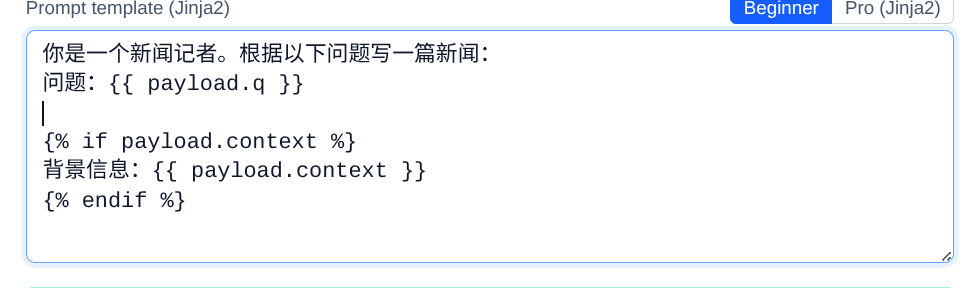
Example:
prompt = """
You are a journalist. Write a news article based on the following question:

Question: {{ payload.q }}

{% if payload.context %}
Background Information: {{ payload.context }}
{% endif %}

Requirements: Under 300 words, objective, and accurate.
"""
JSON Output Mode
class Extractor(Agent):
    llm = "deepseek/deepseek-chat"
    prompt = "Extract entities from the following text: {{ payload.text }}"
    json_output = True
    json_schema = {
        "type": "object",
        "properties": {
            "people": {"type": "array", "items": {"type": "string"}},
            "places": {"type": "array", "items": {"type": "string"}},
        },
    }
    json_unwrap = True  # 'people' / 'places' will be unwrapped directly to the payload root level
    subscribe = ["ner.in"]
    publish = ["ner.out"]
Fan-in Aggregation
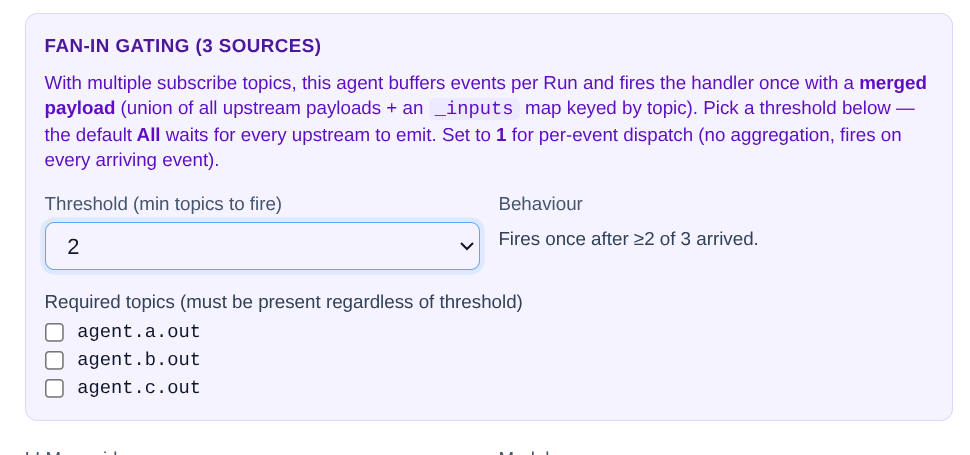
When an Agent needs to wait for multiple upstream topics to arrive before processing:
class Aggregator(Agent):
    subscribe = ["agent.a.out", "agent.b.out", "agent.c.out"]
    publish = ["agent.final.out"]
    aggregate = {
        "threshold": 2,                    # Triggers as soon as any 2 topics are received
        "required": ["agent.a.out"],       # But 'agent.a.out' must be one of them
    }
Per-Agent Guardrail
class Expensive(Agent):
    llm = "openai/gpt-4o"
    guardrail = {
        "max_tokens_per_call": 4000,
        "max_cycles": 3,
    }
    # ...
Overriding handle()
For fully customized logic (ignores prompt / python_script entirely):
class Custom(Agent):
    subscribe = ["custom.in"]
    publish = ["custom.out"]

    async def handle(self, ctx, event):
        # ctx.llm — Pre-bound LLM access
        result = await ctx.llm.chat("hello")
        # ctx.logger — Structured logger (automatically includes run_id / trace_id)
        ctx.logger.info("done", result_len=len(result))
        # ctx.publish — Explicit emission (an alternative side-channel to the return list)
        await ctx.publish(Event("custom.side_effect", {"x": 1}))
        return [Event("custom.out", {"reply": result})]
Runtime-Injected AgentContext
| Attribute | Type | Description |
|---|---|---|
ctx.agent_id |
str |
Unique ID of the current instance |
ctx.template_key |
str |
Agent template name |
ctx.workflow_id |
str |
The workflow ID this agent belongs to |
ctx.run_id |
str |
Current execution run ID |
ctx.trace_id |
str |
End-to-end distributed tracing ID |
ctx.llm |
LLMHandle |
Pre-bound LLM handler (ctx.llm.chat(...) / ctx.llm.complete(...)) |
ctx.logger |
BoundLogger |
Structured logger |
ctx.publish(event) |
async |
Explicitly publishes an event (bypasses the standard return list) |