Agent 定义
Agent 是 Agentflow 的最小处理单元。每个 Agent 订阅一组 topic、处理事件、发布到另一组 topic。
三种定义方式
1. 直接实例化(
from agentkit import Agent

researcher = Agent(
    template_key="researcher",        # 直接构造必须显式给 key(没有类名可推导)
    role="thinking",
    description="搜索并汇总相关信息",
    subscribe=["agent.researcher.in"],
    publish=["agent.researcher.out"],
    llm="deepseek/deepseek-chat",
    prompt="根据以下问题搜索信息:{{ payload.q }}",
    output_field="research",
    max_retries=2,
)

# 直接加入 workflow;任何字段都可在构造时覆盖
wf.add(researcher)
2. 子类方式
from agentkit import Agent, Event

class Researcher(Agent):
    role = "thinking"
    description = "搜索并汇总相关信息"
    subscribe = ["agent.researcher.in"]
    publish = ["agent.researcher.out"]
    llm = "deepseek/deepseek-chat"
    prompt = "根据以下问题搜索信息:{{ payload.q }}"
    output_field = "research"
    max_retries = 2

wf.add(Researcher())   # template_key 默认取蛇形类名 → "researcher"
3. 装饰器方式
from agentkit import agent, Event
from agentkit.runtime.context import AgentContext

@agent(
    template_key="researcher",
    role="thinking",
    subscribe=["agent.researcher.in"],
    publish=["agent.researcher.out"],
)
async def researcher_handler(ctx: AgentContext, event: Event) -> list[Event]:
    result = await ctx.llm.chat(f"搜索:{event.payload['q']}")
    return [Event("agent.researcher.out", {"research": result})]
三者产出的 IR 完全一致。
ClassVar 字段详解
IR 层字段(会写入 WorkflowIR)
| 字段 | 类型 | 默认 | 说明 |
|---|---|---|---|
role |
str |
"thinking" |
Agent 角色:thinking / judge / fetch / tool / memory / guard / human / aggregator |
description |
str |
"" |
人类可读描述 |
template_key |
str \| None |
None |
注册键名(默认为蛇形类名) |
llm |
str \| dict \| None |
None |
LLM 绑定("provider/model" 或 {"provider": ..., "model": ...}) |
subscribe |
list[str] |
[] |
订阅的 topic 列表 |
publish |
list[str] |
[] |
发布的 topic 列表 |
tags |
dict[str, str] |
{} |
标签过滤 |
guardrail |
dict \| None |
None |
Per-agent guardrail({"max_tokens_per_call": N, "max_cycles": M}) |
aggregate |
dict \| None |
None |
Fan-in 聚合({"threshold": N, "required": [topics...]}) |
replicas_min |
int |
1 |
最小副本数 |
replicas_max |
int |
1 |
最大副本数 |
Handler 层字段(控制默认 handler 行为)
| 字段 | 类型 | 默认 | 说明 |
|---|---|---|---|
prompt |
str \| None |
None |
Jinja2 模板 → 设定后自动调 LLM |
system_prompt |
str \| None |
None |
LLM system message |
output_field |
str |
"result" |
LLM 输出写入的字段名 |
max_retries |
int |
0 |
失败重试次数 |
retry_backoff_s |
float |
0.5 |
指数退避初始值 |
preserve_input |
bool |
True |
是否将 event.payload 合并进输出 |
fallback_response |
dict \| None |
None |
重试耗尽后的兜底 payload |
python_script |
str \| None |
None |
替代 LLM 的 Python 逻辑 |
json_output |
bool |
False |
强制 LLM 返回 JSON |
json_schema |
dict \| None |
None |
JSON Schema 验证 |
json_unwrap |
bool |
False |
将 JSON 字段展开到顶层 |
Handler 执行优先级
当你没有重写 handle() 方法时,默认 handler 按以下优先级执行:
- python_script 模式 — 有
python_script字段时: - 调用其中的
def handle(payload)或def handle(payload, event) -
返回的 dict 合并进输出 payload
-
Prompt 模式 — 有
prompt+llm时: - Jinja2 渲染 prompt(变量:
payload.*,event.*,topic) - 调 LLM
-
响应写入
output_field -
Pass-through 模式 — 两者都没有:
- 直接转发
event.payload
python_script 详解
class Calculator(Agent):
    subscribe = ["calc.in"]
    publish = ["calc.out"]
    output_field = "answer"
    python_script = """
def handle(payload, event=None):
    expr = payload.get("expr", "0")
    try:
        return {"answer": str(eval(expr))}
    except Exception as e:
        return {"answer": f"Error: {e}"}
"""
规则:
| 要求 | 说明 |
|---|---|
| 函数名 | 必须是 handle |
| 签名 | def handle(payload) 或 def handle(payload, event) |
| 返回值 | dict(将被合并进 output payload) |
| async | 支持 async def handle(...) |
| 导入 | 允许,但受限于运行环境的 site-packages |
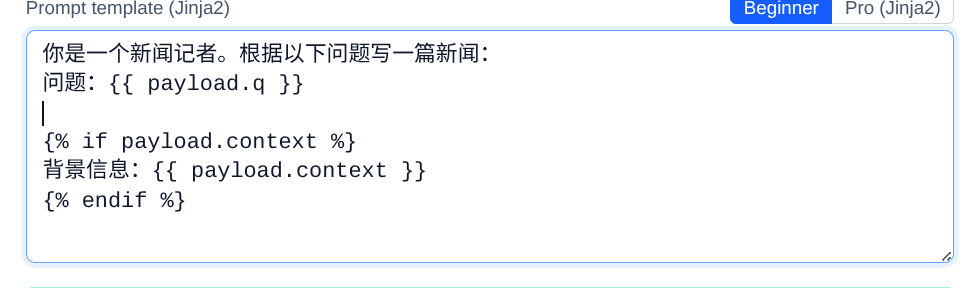
Jinja2 Prompt 模板
可用变量:
| 变量 | 说明 |
|---|---|
payload |
event.payload 完整 dict |
payload.<field> |
直接访问顶层字段 |
event |
完整 Event 对象 |
topic |
当前 event 的 topic 字符串 |
示例:
prompt = """
你是一个新闻记者。根据以下问题写一篇新闻:

问题:{{ payload.q }}

{% if payload.context %}
背景信息:{{ payload.context }}
{% endif %}

要求:300字以内,客观准确。
"""
Jinja 模板前端导入
JSON Output 模式
class Extractor(Agent):
    llm = "deepseek/deepseek-chat"
    prompt = "从以下文本提取实体:{{ payload.text }}"
    json_output = True
    json_schema = {
        "type": "object",
        "properties": {
            "people": {"type": "array", "items": {"type": "string"}},
            "places": {"type": "array", "items": {"type": "string"}},
        },
    }
    json_unwrap = True  # people / places 直接展开到 payload 顶层
    subscribe = ["ner.in"]
    publish = ["ner.out"]
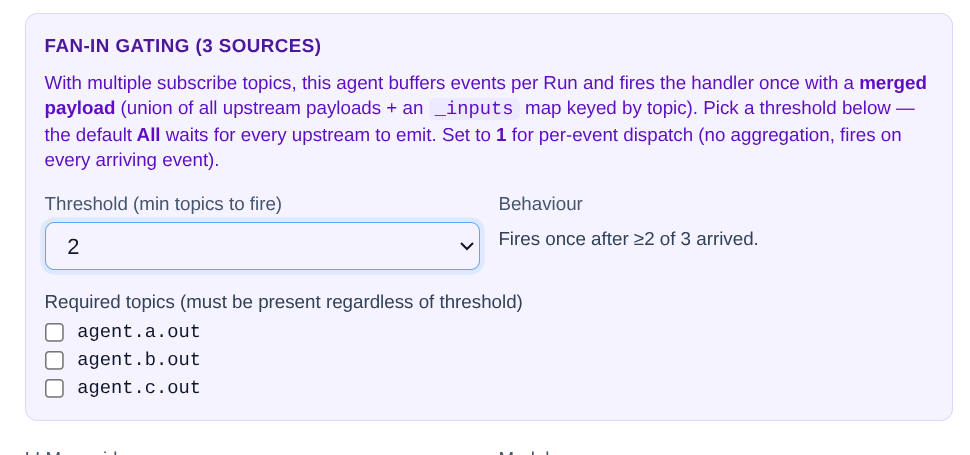
Fan-in 聚合
当一个 Agent 需要等待多个上游 topic 到齐才处理:
class Aggregator(Agent):
    subscribe = ["agent.a.out", "agent.b.out", "agent.c.out"]
    publish = ["agent.final.out"]
    aggregate = {
        "threshold": 2,                    # 收到 2 个就触发
        "required": ["agent.a.out"],       # 但 a 必须在其中
    }
聚合器前端展示
Per-Agent Guardrail
class Expensive(Agent):
    llm = "openai/gpt-4o"
    guardrail = {
        "max_tokens_per_call": 4000,
        "max_cycles": 3,
    }
    # ...
重写 handle()
完全自定义逻辑(忽略 prompt / python_script):
class Custom(Agent):
    subscribe = ["custom.in"]
    publish = ["custom.out"]

    async def handle(self, ctx, event):
        # ctx.llm — 预绑定的 LLM 访问
        result = await ctx.llm.chat("hello")
        # ctx.logger — 结构化日志(自动带 run_id / trace_id)
        ctx.logger.info("done", result_len=len(result))
        # ctx.publish — 额外 emit(除了 return 外的另一种方式)
        await ctx.publish(Event("custom.side_effect", {"x": 1}))
        return [Event("custom.out", {"reply": result})]
运行时注入的 AgentContext
| 属性 | 类型 | 说明 |
|---|---|---|
ctx.agent_id |
str |
当前实例唯一 ID |
ctx.template_key |
str |
Agent 模板名 |
ctx.workflow_id |
str |
所属 workflow |
ctx.run_id |
str |
当前 run ID |
ctx.trace_id |
str |
全链路追踪 ID |
ctx.llm |
LLMHandle |
预绑定 LLM(ctx.llm.chat(...) / ctx.llm.complete(...)) |
ctx.logger |
BoundLogger |
结构化 logger |
ctx.publish(event) |
async |
显式 publish(绕过 return 列表) |