快速入门
安装
Hello World — 本地单 Agent
from agentkit import Agent, workflow, START, END, Event
from agentkit.testing import LocalRuntime

class Echo(Agent):
    """原样返回输入。"""
    role = "thinking"
    subscribe = ["agent.echo.in"]
    publish = ["agent.echo.out"]

    async def handle(self, ctx, event):
        return [Event("agent.echo.out", {"text": event.payload.get("q", "")})]

# 构建 workflow
wf = workflow("wf_hello")
echo = Echo()
wf.add(echo)
wf.connect(START, echo)
wf.connect(echo, END)

# 本地运行
import asyncio

async def main():
    async with LocalRuntime(wf) as rt:
        run = await rt.run(input={"q": "你好 Agentflow"})
        print(f"状态: {run.status}")  # Succeeded
        # 取最后一个 envelope
        last = [e for e in rt.bus.published if not e.topic.startswith("system.")][-1]
        print(f"输出: {last.payload}")

asyncio.run(main())
输出:
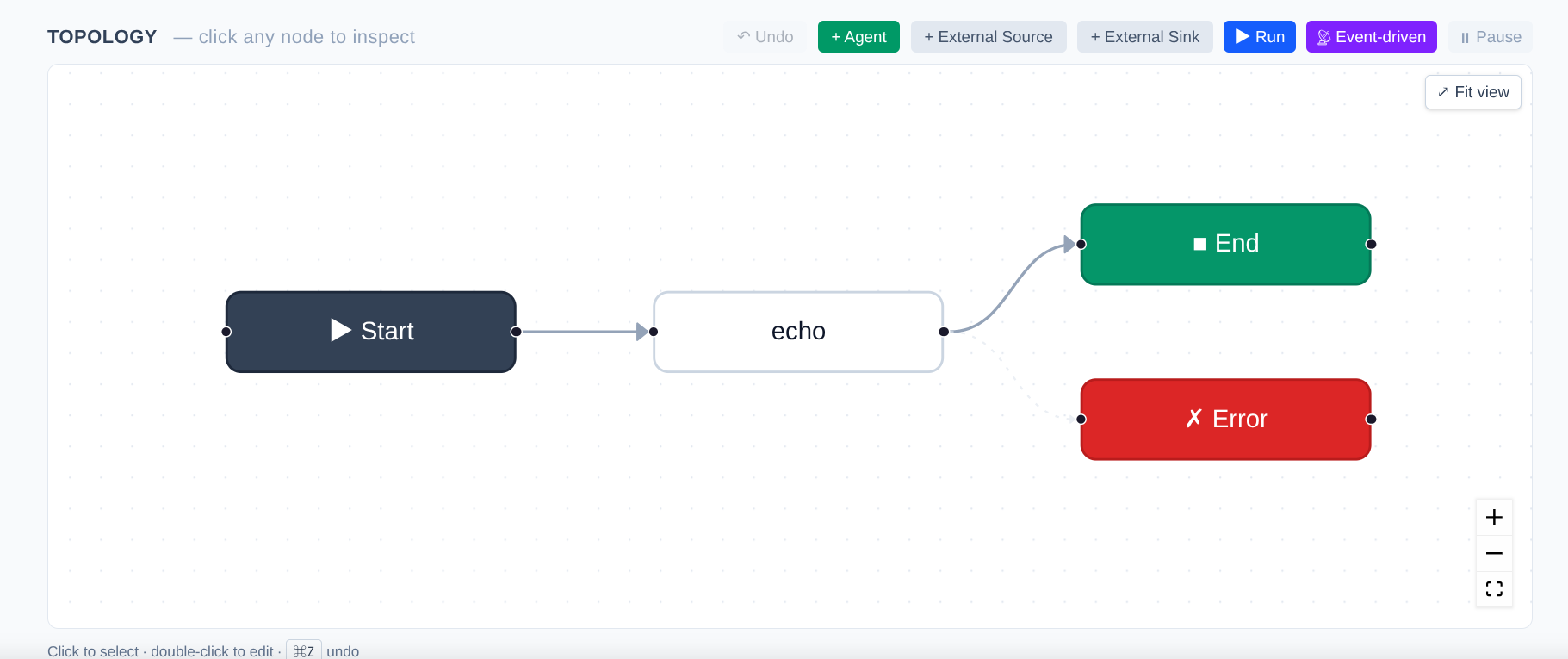
Echo Agent workflow in UI
使用 LLM Prompt
不重写 handle(),用声明式 prompt 取代:
class Tagger(Agent):
    role = "thinking"
    subscribe = ["agent.tagger.in"]
    publish = ["agent.tagger.out"]
    llm = "deepseek/deepseek-chat"
    prompt = "对以下新闻做情感标注(正面/负面/中性):{{ payload.text }}"
    output_field = "sentiment"
    max_retries = 2
    fallback_response = {"sentiment": "unknown"}

async def main():
    NEWS = (
        "新加坡居民可通过星展银行 DBS Remit 汇款至微信钱包。"
        "新加坡公民、永久居民和居住在本地的外籍人士,即日起可通过星展集团"
        "手机银行 DBS digibank 的 DBS Remit,向中国电子钱包微信支付汇款,"
        "交易无需手续费。"
    )
    wf_tag = workflow("wf_tagger")
    tag = Tagger()
    wf_tag.add(tag).connect(START, tag).connect(tag, END)

    if HAS_DEEPSEEK_KEY:
        api_key = (os.environ.get("DEEPSEEK_API_KEY") or
                os.environ.get("AGENTKIT_LLM_DEEPSEEK_API_KEY"))
        llm_arg = build_llm_gateway(
            instances=[
                LLMInstanceConfig(
                    name="deepseek",
                    adapter="openai",
                    compat="deepseek",
                    api_key=api_key,
                    base_url="https://api.deepseek.com/v1",
                )
            ],
            default_provider="deepseek",
            default_model="deepseek-chat",
        )
        print("\n✅ 使用真实 DeepSeek API")
    else:
        llm_arg = MockLLMGateway(reply="正面")
        print("\n⚠ 未检测到 DEEPSEEK_API_KEY,回落 MockLLM")

    async with LocalRuntime(wf_tag, llm=llm_arg) as rt:
        run = await rt.run(input={"text": NEWS}, timeout=60)
当 prompt + llm 均设定时,默认 handler 自动:
- 渲染 Jinja2 模板(可引用
payload.*/event.*) - 调 LLM
- 将回复写入
output_field - publish 到
publish[0]
使用 python_script 模式
不想依赖 LLM 且不想写类方法?用 python_script:
class Scorer(Agent):
    subscribe = ["agent.scorer.in"]
    publish = ["agent.scorer.out"]
    output_field = "score"
    python_script = """
def handle(payload):
    text = payload.get("text", "")
    return {"score": len(text) / 100}
"""
规则:
- 必须定义
def handle(payload)或def handle(payload, event) - 返回
dict(合并进 output payload) - 支持
async def
CLI 运行
# 初始化项目
agentkit init my_project

# 校验 YAML
agentkit validate workflows/wf_hello.yaml

# 本地执行(使用 Mock LLM)
agentkit run workflows/wf_hello.yaml \
  --input '{"q": "hello"}' \
  --handlers handlers \
  --timeout 10

# 启动 Web UI + API server
agentkit serve --port 8080 --workflows workflows/
部署到远程服务器
from agentkit import AgentKitClient

async with AgentKitClient("http://localhost:8080") as c:
    await c.deploy(wf)
    run = await c.create_run("wf_hello", input={"q": "ping"})
    print(run)
更多见 控制平面客户端。
下一步
- 深入 Agent 定义 了解全部字段
- 学习 Workflow 构建 掌握多 agent 图编排
- 接入 External I/O 连通 Telegram / Email